Google Messages
Google LLC
Nov 12, 2014
Oct 17, 2024
Varies with device
Varies with device
5,000,000,000+

Description
💬 Google Messages – The Ultimate Messaging Experience on Android
Staying connected has never been easier, thanks to Google Messages. This Android messaging app combines simplicity, speed, and advanced features to deliver a smooth texting experience. Whether you’re sending quick texts, media files, or chatting in group Threads, Google Messages ensures your conversations are seamless and secure.
🚀 Why Google Messages Stands Out
Unlike many messaging Apps that overload users with unnecessary features, Google Messages focuses on clarity and usability. Its interface is clean, intuitive, and designed to make texting a hassle-free experience. Key highlights include:
- Smart Replies – Get AI-powered suggestions to respond faster to messages.
- RCS Support – Chat over Wi-Fi or mobile data with richer messaging features, including read receipts and typing indicators.
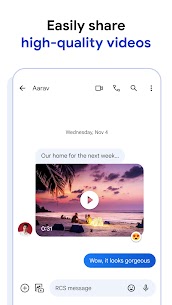
- Media Sharing – Send photos, videos, voice messages, and GIFs effortlessly.
- Search Functionality – Quickly find conversations, contacts, and shared media.
With these tools, Google Messages isn’t just a messaging app—it’s a communication hub that keeps everything organized and accessible.
🛡️ Privacy and Security Features
Google takes your privacy seriously. With Google Messages, you can:
- Block spam messages automatically and report suspicious contacts.
- End-to-end encryption for one-on-one chats to protect sensitive conversations.
- Secure storage of media and messages through your Google account.
These measures ensure that your conversations remain safe without sacrificing convenience.
📱 Tips for Maximizing Your Experience
- Enable Chat Features – Activate RCS for enhanced messaging capabilities.
- Use Labels – Organize your conversations with categories for work, friends, or family.
- Pin Important Chats – Keep frequently used contacts at the top for easy access.
- Explore Widgets – Add shortcuts to your home screen for quick messaging.
By applying these tips, you’ll make your messaging experience faster, smarter, and more efficient.
🔗 Internal & External Resources
- Discover more Android apps in our Best Messaging Apps 2026 Guide.
- Learn about RCS messaging features and how to enable them.
- Check Google’s official support page for troubleshooting and tips.
🌟 Conclusion
Google Messages is more than just a texting app. Its combination of speed, simplicity, and smart features makes it one of the most reliable messaging platforms for Android users in 2026. From casual chats to important communications, Google Messages ensures your conversations are always clear, connected, and secure.
Upgrade your messaging today and experience the effortless power of Google Messages. 💌📲
What's new
• Bug fixes and stability improvements.
Images